Seznam automatizací v PowerAutomate pro inspiraci
-
- Remind me every year that someone on the team has a birthday.
- Remind me to fill out my attendance sheet every Friday
- V 8:00 mi pošli přehled dnešních schůzek do emailu / Teams
- Reminder 24 hours before a regular meeting: Do you have anything to discuss or should I cancel it?
- Schedule/defer a reply in Teams chat
- Saving an email attachment to OneDrive
- Take the new response in the form, transfer it somewhere (Lists/Excel) and notify someone
- Create a task in Planner when someone writes “TODO message” in a channel
- In the morning, check your open tasks in Planner and send them to me by email.
- Send me a notification when a new file is created on Sharepoint/OneDrive
- Extract data from attached file (invoices etc.)
- Jsem nemocný/nemocná, pošli email nadřízenému a nastav mi OOO
- Dej mi vědět, když mi někdo přidá soubor do složky na OneDrive
- Vytvoř OneNote stránku pro nadcházející schůzku za 15 minut
- IFTTT https://ifttt.com/
Standard troubleshooting steps
- Flow checker / Copilot in PowerAutomate
- Discussion/consultation with Chatgpt / Copilot Chat / Claude (explained in detail)
- Videa na YouTube a Google (fóra)
- Screenshot / Stream video to someone more senior
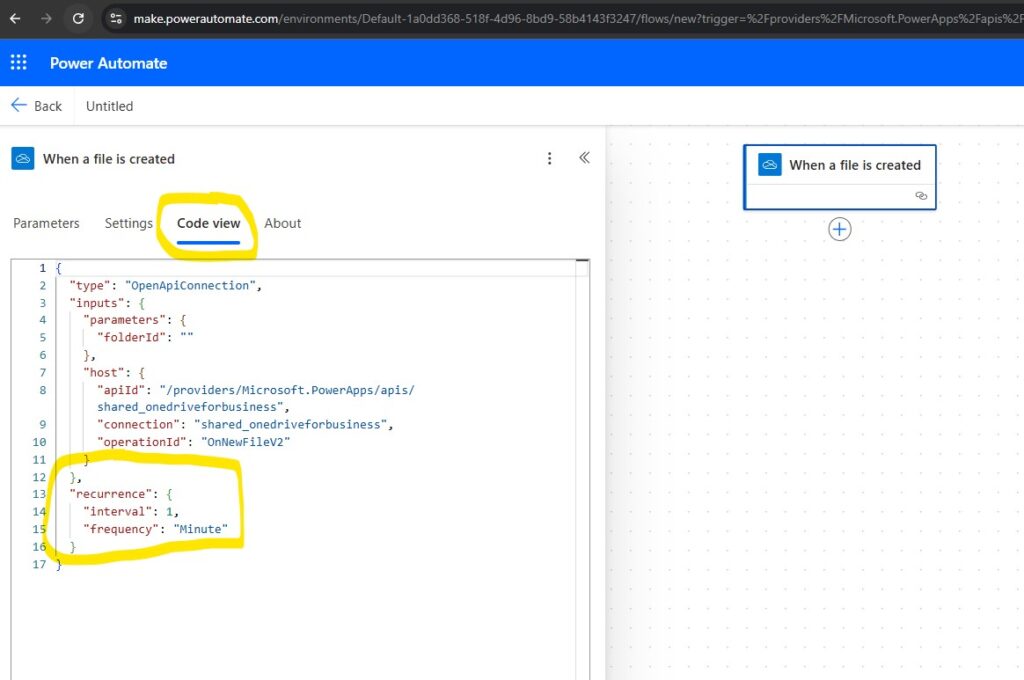
Automated trigger recurrence frequency
Back in early 2025, you could define how often PowerAutomate should check whether the condition for starting the flow was met. It seems that it is no longer there and it is set to 1 minute by Microsoft by default. That is, it always takes up to a minute for the flow to start. I am attaching a screenshot "Automated trigger recurrence frequency", where you can find the parameter in the code. However, as a standard user, you don't have to deal with this.
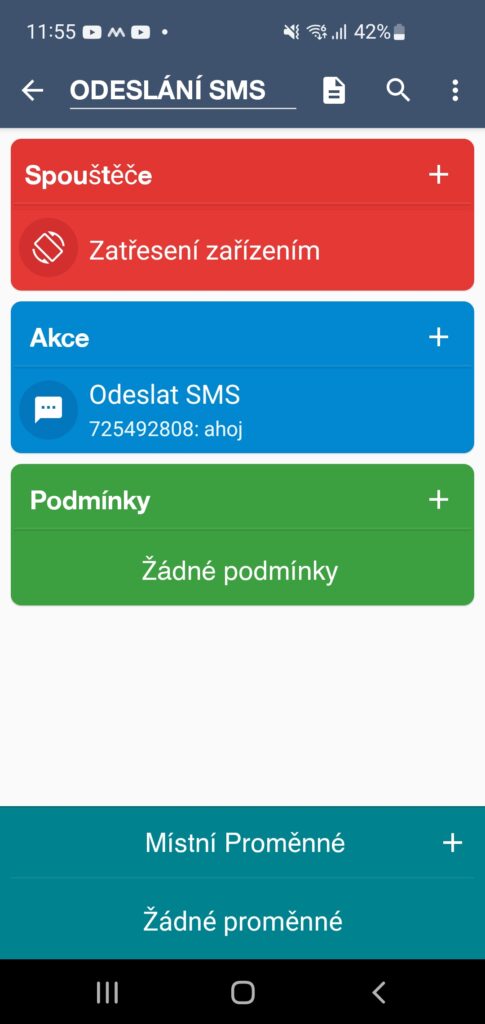
Ukázka automatizace odesílání SMS na Androidu
- Set up via MacroDroid app https://play.google.com/store/apps/details?id=com.arlosoft.macrodroid (see screenshot)
- SMS se odešle automaticky po zatřesení mobilem v ruce, nastaveno v sekci Nové makro
- MarcoDroid runs for free for only 7 days and then you have to pay for it. I would like to remind you of an alternative (also paid): https://play.google.com/store/apps/details?id=net.dinglisch.android.taskerm&hl=cs
- Routines for Samsung are free, but they can't send SMS automatically YET (https://www.samsung.com/cz/support/mobile-devices/jak-pouzivat-bixby-routines/)